
Add preview thumbnails (Android v3)
Add preview images that appear when a user hovers over the control bar or seeks through a media asset.

JWP supports the loading of preview thumbnails for individual shots or scenes in a video. These thumbnails are displayed in a tooltip when a viewer hovers the control bar.
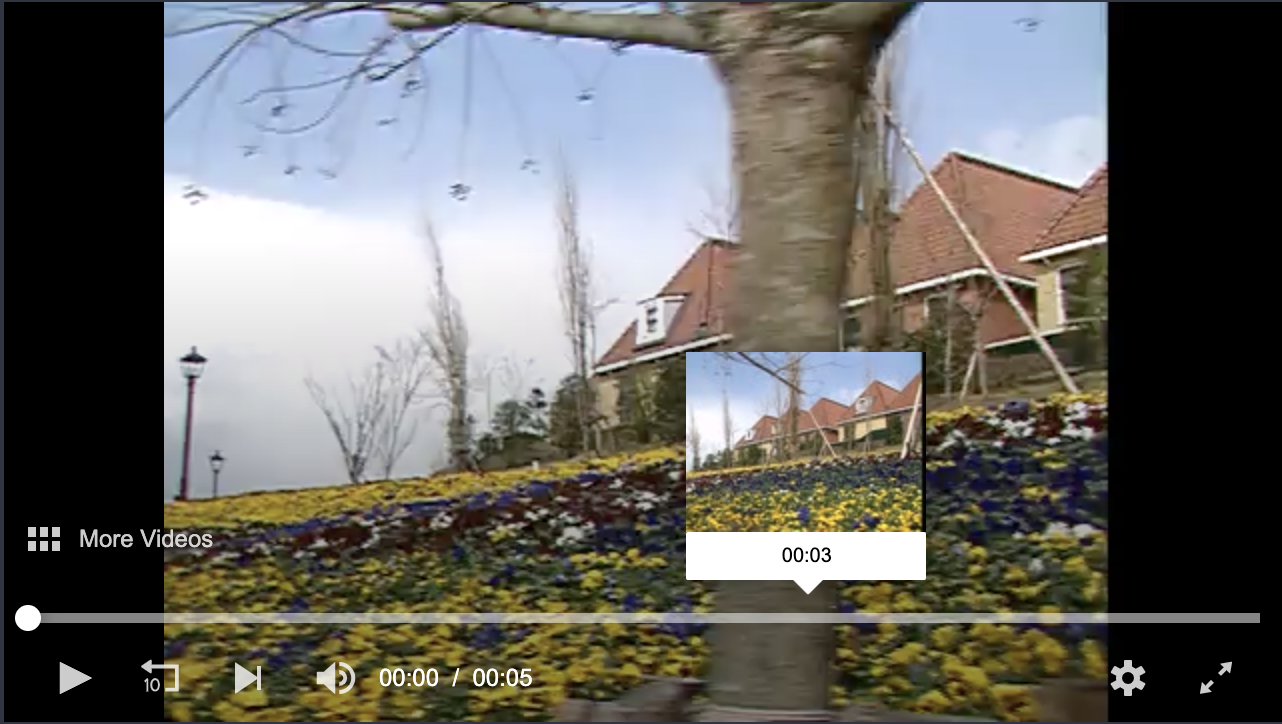
Preview thumbnail appearing on top of a media asset.
Preview thumbnail overview
In the Android SDK, you define your preview thumbnails in a single .vtt file. The .vtt file is part of a thumbnail Caption that is assigned to a PlaylistItem.
For an optimal user experience, the thumbnails should adhere to the following:
- URLs must point to individual thumbnail files (filename.jpg) or to the spacial media fragment (filename.jpg#xywh=0,0,120,90) in a thumbnail sprite
- URLs must be relative to the .vtt file
- Thumbnail width of 100-150 px
WEBVTT

00:00.000 --> 00:02.000
5s2afBXZ-120.jpg#xywh=0,0,120,90

00:02.000 --> 00:05.005
5s2afBXZ-120.jpg#xywh=120,0,120,90
WEBVTT
00:00.000 --> 00:02.000
scene1_0.jpg
00:02.000 --> 00:05.005
scene1_1.jpgWhen a media asset is uploaded to your JWP account, a thumbnail track file is created as part of the transcoding process. So, instead of creating a new .vtt file for a video asset, you can copy the URL of the thumbnail track file from your JWP dashboard.
To locate the thumbnail track of a specific video asset, follow these steps:
- From the video list page, click the name of a video.
- On the ASSET tabs, scroll down to Tracks section.
- Click the Thumbnail track row.
- Copy the Direct Link URL.
Adding preview thumbnails to an app
- In your main activity, create a
List<Caption>object and name it, for example,thumbnailTrack. - Create a
Captionobject and name it, for example,previewThumbnail. - In the
Captionobject, define the preview thumbnail .vtt file URL (file). You can use the .vtt file mentioned in the TIP box above that JWP creates during the transcoding process. - Define the Caption object as a thumbnail track (
kind(THUMBNAILS)) - Add
previewThumbnailtothumbnailTrack. - Add
thumbnailTrackto aPlaylistItemobject.
List<Caption> thumbnailTrack = new ArrayList<>();

Caption previewThumbnail = new Caption.Builder()
    .file("https://cdn.jwplayer.com/strips/{media_id}-120.vtt")
    .kind(THUMBNAILS)
    .build();
thumbnailTrack.add(previewThumbnail);

PlaylistItem playlistItem = new PlaylistItem.Builder()
    .file("https://cdn.jwplayer.com/manifests/{media_id}.m3u8")
    .image("https://www.mydomain.com/poster.jpg")
    .title("Playlist-Item Title")
    .description("Some really great content")
    .tracks(thumbnailTrack)
    .build();

List<PlaylistItem> playlist = new ArrayList<>();
playlist.add(playlistItem);
PlayerConfig config = new PlayerConfig.Builder()
    .playlist(playlist)
    .build();
mPlayerView.setup(config);
Updated 8 days ago