
Create an SSAI strategy
Learn how to set up an SSAI strategy and configure its settings
SSAI strategies allow you to tailor server-side ad experiences for different viewers by defining logic that determines which ad config is delivered during SSAI stitching.
Using the strategy editor, you can create rules based on request attributes, such as query parameters, or run A/B tests to compare ad performance across different ad configs.
Prerequisites
| Item | Description |
|---|---|
| Account entitlements | Entitlements to unlock feature access:
For more information, please contact your account representative. |
| Ad config ID | Unique identifier of an ad config Follow these steps to obtain an ad config ID:
|
Create an SSAI strategy
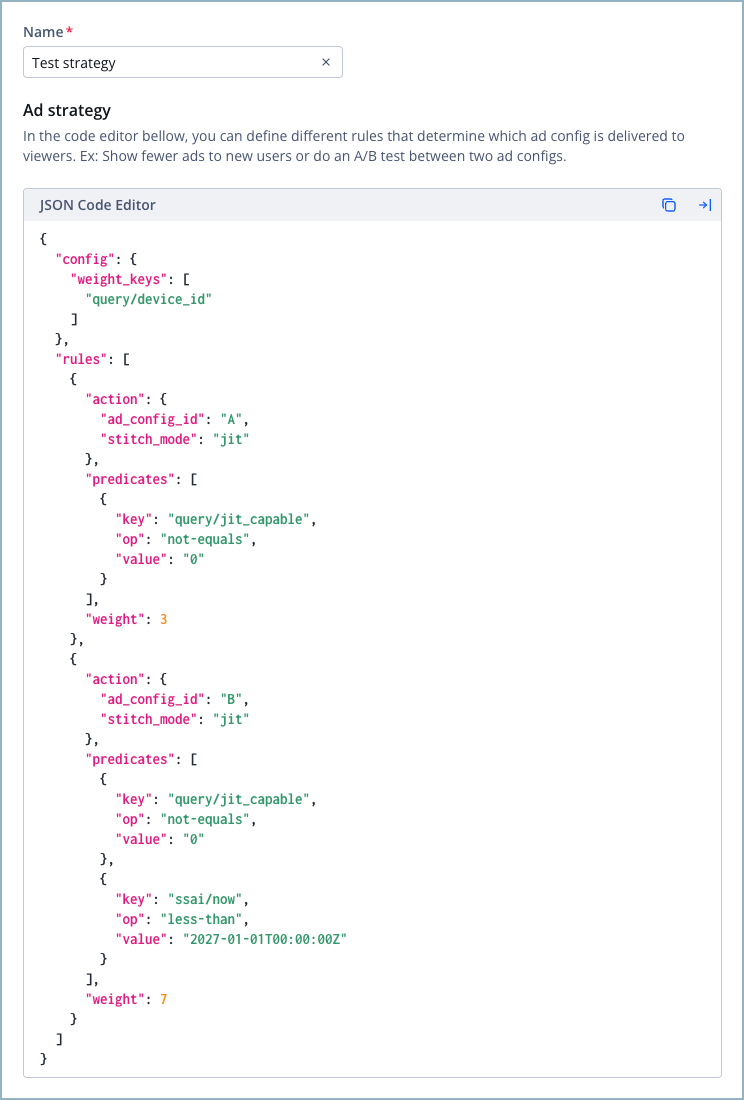
JSON code editor
Follow these steps to create an SSAI strategy from your JWX dashboard:
-
On the Ad insertion page, under the Ad strategy tab, click Create ad strategy. The ad strategy details page appears.
-
Enter a Name for the ad strategy.
-
In the JSON code editor, define your strategy.
-
Click Save. The new SSAI strategy appears in the list on the Ad strategy tab, along with its strategy ID.
-
In the row of a strategy, in the ID column, click
 (copy icon) to copy the strategy ID to your clipboard.
 -
In your SSAI manifest request, add the strategy ID as the value for your
ad_config_id. This activates the strategy.https://cdn.jwplayer.com/v2/sites/{site_id}/media/{media_id}/ssai.{manifest_extension}?ad_config_id={strategy_id}
The new SSAI strategy is now ready to be applied to a viewer session.
Define a strategy
Using the JSON code editor, you can define how a strategy evaluates incoming SSAI requests and determines which ad experience is applied.
Before creating an SSAI strategy, decide how the strategy should behave at request time. Consider the following questions.
| Questions | Response |
|---|---|
| Which request attributes will be available? | Decide which query parameters or request headers your application will include in the SSAI manifest request (such as device capabilities, user segments, or custom identifiers). |
| When should JIT vs non-JIT stitching be used? | Determine whether certain devices, platforms, or user segments require a specific stitching mode. |
| How should traffic be split? | Decide whether traffic should be routed entirely by conditions, split using weighted A/B testing, or kept sticky to a specific variant using a stable identifier. |
Having these decisions in place will help you define a clear, predictable strategy, as in the example below.
The following example shows a complete SSAI strategy that applies different ad configs and stitch modes depending on which rule is selected:
- Uses a custom query parameter (
device_id) to distribute A/B test traffic deterministically - Sends non-JIT-capable devices to non-JIT stitching (
ssai) using ad configsCandD - Runs a weighted A/B test until a specified date (
2027-01-01)
Learn more about this strategy.
How is this strategy evaluated?
When an SSAI request is received, SSAI evaluates the strategy as follows:
- All rules are filtered based on their
predicates.- If multiple rules remain, SSAI compares their
weightvalues and distributes traffic proportionally.- The selected rule’s
actiondetermines both the ad config and stitching mode used for the request.
What happens after the date condition expires?
The strategy rule includes the following date-based predicates.
{
  "key": "ssai/now",
  "op": "less-than",
  "value": "2027-01-01T00:00:00Z"
}
This means the rule is only eligible when the request time is before January 1, 2027.
After that date:
- The predicate no longer matches.
- The rule is excluded from evaluation.
- All traffic (100%) is routed using the remaining matching rules.
The strategy does not fail or stop working. It simply evaluates to the remaining applicable rule.
{
  "config": {
    "weight_keys": [
      "query/device_id"
    ]
  },
  "rules": [
    // When the device is JIT-capable, traffic will split between ad configs A (30%) and B (70%) if the request occurs before 1 January 2027. If the request occurs after that date, all traffic will route to ad config A (100%), which is not time-bound.
    {
      "predicates": [
        {
          "key": "query/jit_capable",
          "op": "not-equals",
          "value": "0"
        }
      ],
      "weight": 3,
      "action": {
        "ad_config_id": "A",
        "stitch_mode": "jit",
        "bumpers": "off"
      }
    },
    {
      "predicates": [
        {
          "key": "query/jit_capable",
          "op": "not-equals",
          "value": "0"
        },
        {
          "key": "ssai/now",
          "op": "less-than",
          "value": "2027-01-01T00:00:00Z"
        }
      ],
      "weight": 7,
      "action": {
        "ad_config_id": "B",
        "stitch_mode": "jit",
        "bumpers": "both"
      }
    },

    // When the device is not JIT-capable, traffic will split between ad configs C (30%) and D (70%) if the request occurs before 1 January 2027. If the request occurs after that date, all traffic will route to ad config C (100%), which is not time-bound.
    {
      "predicates": [
        {
          "key": "query/jit_capable",
          "op": "equals",
          "value": "0"
        }
      ],
      "weight": 3,
      "action": {
        "ad_config_id": "C",
        "stitch_mode": "ssai",
        "bumpers": "off"
      }
    },
    {
      "predicates": [
        {
          "key": "query/jit_capable",
          "op": "equals",
          "value": "0"
        },
        {
          "key": "ssai/now",
          "op": "less-than",
          "value": "2027-01-01T00:00:00Z"
        }
      ],
      "weight": 7,
      "action": {
        "ad_config_id": "D",
        "stitch_mode": "ssai",
        "bumpers": "both"
      }
    }
  ]
}
Top level strategy
| Field | Description |
|---|---|
| weight_keys array | Request attributes used to determine traffic weighting and ensure consistent viewer assignment across requests |
| Field | Description | ||||||
|---|---|---|---|---|---|---|---|
| predicates array | Conditions that must be met at request time for a viewer to receive an ad experience See predicates for more information. |
||||||
| weight integer | Controls how traffic is split between matching rules using simple ratios When multiple rules match a request, SSAI compares their weight values and distributes the traffic proportionally.
| ||||||
| action object | Defines the outcome applied when the rule is selected See action for more information. |
| Field | Description |
|---|---|
| key string | Request or media data attribute that SSAI evaluates using the predicate’s value
You can pass the key from different sources:
Learn about media keysmedia/{key} allows you to control the ad load based on the requested media item’s metadata. You can reference the following fields:
Use lowercase field names. Available media keys depend on the metadata populated for the requested media item. |
| op | Comparison operator for the key and value Possible values:
|
| value | Data the key must match for the rule to apply
|
| Field | Description |
|---|---|
| ad_config_id string | Unique identifier of the ad config that should be broadcast to the viewer |
| bumpers string | Controls whether bumper videos are shown before and after an ad break Possible values:
|
| stitch_mode string | Method used to stitch ads into the stream Possible values:
|
Updated 16 days ago