
Create a new creative
A creative is the ad asset delivered to viewers through the video player. In the ad server, creatives must be linked to line items for them to run.
You can configure creatives to define the ad type, set source details, and add trackers.
Set up a creative
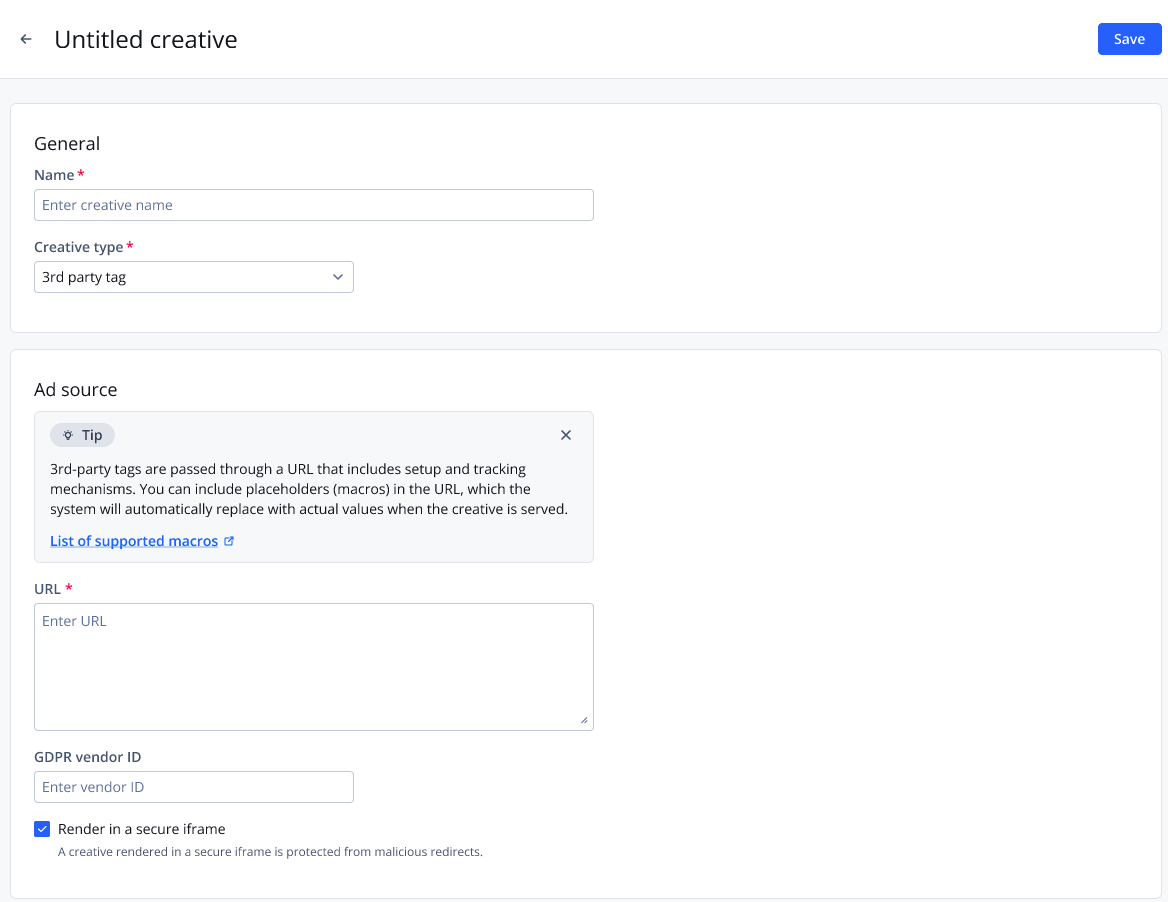
Creative settings page
Follow these steps to set up a creative:
-
On the Creatives page, click Create creative. The creative settings page appears.
-
Enter a Name for the creative.
-
Select a Creative type.
Learn about the technical specifications for creatives delivered through the JWX Ad Server
-
Define the Ad source settings.
3rd party tag
A creative type that uses a client-side tag passed through a URL for third-party tracking of impressions, clicks, or other events
Setting Description URL URL of the external ad tag GDPR vendor ID Identifier of the GDPR vendor
Default: 143
Render in a secure iframe Protects creatives from malicious redirects
Media asset
A creative type that uses an uploaded media file as the ad, with the option to direct traffic to a specified sponsorship URL
Setting Description Upload file Media file ad creative
Maximum file size: 8GB
Supported formats:- .mp4
- .flv
- .mkv
Click URL Click-through destination of the ad GDPR vendor ID Identifier of the GDPR vendor
Default: 143
Render in a secure iframe Protects creatives from malicious redirects
GAM mediation
A creative type that enables Google Ad Manager (GAM) demand to compete with the JWX Ad Server auction, allowing the highest-value eligible ad to serve.
Setting Description Tag URL GAM ad tag URL
Leave blank only if you plan to provide the tag dynamically using Dynamic Strategy Rules.
GDPR vendor ID Identifier of the GDPR vendor Bid price key GAM targeting key that receives the winning JWX bid price
This value must match the targeting key used by your GAM price buckets or Unified Pricing Rules (UPRs).
If omitted, JWX uses
cnxbidas the default key.Cached URL key GAM targeting key that receives the winning JWX bid price
This value must match the targeting key used by your GAM price buckets or Unified Pricing Rules (UPRs).
If omitted, JWX uses
cnxbidas the default key.Min price / Max price / Price increment Pacing settings to define the minimum, maximum, and increment used to generate price buckets sent to GAM
If omitted, JWX generates price buckets using a minimum price of 1.00, a maximum price of 50.99, and a price increment of 0.01.
Render in iFrame Protects creatives from malicious redirects
JS API defined
A creative type where ad tags are embedded in JavaScript within the HTML code, allowing the browser to retrieve ad details and CPM dynamically
Setting Description GDPR vendor ID Identifier of the GDPR vendor
Default: 143
Render in a secure iframe Protects creatives from malicious redirects
Prebid.js
An open-source header bidding technology that exposes your inventory to multiple demand partners
Setting Description Prebid timeout (Required) Maximum time allowed for demand partners to respond with a bid, in milliseconds
This value determines how long the auction waits before selecting a winner. Only bids received within this limit are considered.
Default: 1000
NOTE: This setting can only be changed after the creative has been created.
GDPR vendor ID Identifier of the GDPR vendor
Default: 143
Ad type Media format of the creative Display time (Display) Length of time the creative remains visible, in seconds Auto-generated GPID System-created Global Placement ID used to uniquely identify an ad impression Render in a secure iframe Protects creatives from malicious redirects
Demand partner
A demand partner for Prebid.js is typically a bidder adapter that bids through the client-side Prebid auction using the publisher’s configured partner parameters.
See the Demand partner reference to define the fields for your demand partner.
Smart server bidding
A creative type that runs real-time bidding (RTB) line items through your own supply-side platform (SSP) seat connection, enabling direct calls to demand partners with your unique seat ID
This oRTB connection provides a server-to-server alternative to client-side Prebid.
Ad sourceSetting Description Ad type Media format of the creative Display time (Display) Length of time the creative remains visible, in seconds Auto-generated GPID System-created Global Placement ID used to uniquely identify an ad impression Render in a secure iframe Protects creatives from malicious redirects
Demand partner
A demand partner for Smart Server Bidding (SSB) is typically a supply-side platform (SSP) that bids through a direct server-to-server integration using the publisher’s own SSP account.
See the Demand partner reference to define the fields for your demand partner.
Deal
A creative type that lets you run self-sourced programmatic deals through the ad exchange, using a demand partner, deal ID, and buyer ID
Ad sourceSetting Description Render in a secure iframe Protects creatives from malicious redirects
Demand partner
A demand partner is an advertising source that bids for and delivers ads through the ad server. A demand partner can be a demand-side platform (DSP).
See the Demand partner reference to define the fields for your demand partner.
Amazon TAM/UAM
A creative type that connects your inventory to Amazon’s Transparent Ad Marketplace (TAM) or Unified Ad Marketplace (UAM) for programmatic demand
Setting Description Upload CSV file File used to import Amazon TAM price bucket mappings for bulk setup
The file must include two columns without headings: CPM and ID. Each row pairs a CPM value (price bucket) with its corresponding Amazon bid code ID. IDs must not be duplicated.
This mapping allows the system to match Amazon’s bid responses to the correct price tiers and creatives, enabling accurate reporting and delivery across multiple TAM price points.
Publisher ID Unique identifier from Amazon for your publisher account TAM slot name Identifier (div ID) of the slot where the creative is rendered
The value is provided by Amazon’s Transparent Ad Marketplace (TAM). You can add multiple slots.
Ad type Media format of the creative Display time (Display) Length of time the creative remains visible, in seconds Auto-generated GPID System-created Global Placement ID used to uniquely identify an ad impression Render in a secure iframe Protects creatives from malicious redirects
Amazon TAM - Deals
A creative type that runs programmatic deals through Amazon’s Transparent Ad Marketplace (TAM), connecting advertiser demand to your inventory under agreed terms
Setting Description Amazon deals Programmatic deals configured in Amazon’s Transparent Ad Marketplace (TAM)
An Amazon deal connects advertiser demand to your inventory under agreed terms.
Publisher ID Unique identifier from Amazon for your publisher account TAM slot name Identifier (div ID) of the slot where the creative is rendered
The value is provided by Amazon’s Transparent Ad Marketplace (TAM). You can add multiple slots.
Ad type Media format of the creative Display time (Display) Length of time the creative remains visible, in seconds Auto-generated GPID System-created Global Placement ID used to uniquely identify an ad impression Render in a secure iframe Protects creatives from malicious redirects
Amazon private auction (PMP)
A creative type that runs private marketplace (PMP) deals through Amazon’s Transparent Ad Marketplace (TAM), giving select buyers access to your inventory under negotiated terms
Setting Description Upload CSV file File used to import Amazon TAM price bucket mappings for bulk setup
The file must include two columns without headings: CPM and ID. Each row pairs a CPM value (price bucket) with its corresponding Amazon bid code ID. IDs must not be duplicated.
This mapping allows the system to match Amazon’s bid responses to the correct price tiers and creatives, enabling accurate reporting and delivery across multiple TAM price points.
Publisher ID Unique identifier from Amazon for your publisher account TAM slot name Identifier (div ID) of the slot where the creative is rendered
The value is provided by Amazon’s Transparent Ad Marketplace (TAM). You can add multiple slots.
Ad type Media format of the creative Display time (Display) Length of time the creative remains visible, in seconds Auto-generated GPID System-created Global Placement ID used to uniquely identify an ad impression Render in a secure iframe Protects creatives from malicious redirects
-
(Optional) Add a tracker:
-
Under Trackers, click Create tracker. The Create tracker panel appears.
-
Enter the Name.
-
Define the tracker.
Setting Description Trigger Event that activates a tracker - Impression
- Complete 25%
- Complete 50%
- Complete 75%
- View Completion
- Video Click
- Pause
- Resume
- Mute
- Unmute
Type Format of the tracker to be used
Possible options:- Image: One-by-one (1x1) pixel tracker
- JavaScript: Script-based tracker
URL Tracker link provided by the advertiser
-
Click Done. The panel closes. The tracker appears under Trackers.
Built-in ad server reporting shows line item performance across key revenue and delivery metrics.
Adding a tracker is optional and offers supplemental insights, such as custom event tracking.
-
-
Click Save.
You can build a line item with this creative.
Updated 3 days ago