
Set georestricting rules for a property

By setting a georestricting rule for a property, the rule applies to all the cloud-hosted or registered content.
Be mindful of the following when setting georestricting rules:
Georestricting rules apply only to the content played within a player. Player libraries are not impacted by georestricting rules.
Only Admin user accounts can modify a property’s global georestricting setting.
Set a georestricting rule
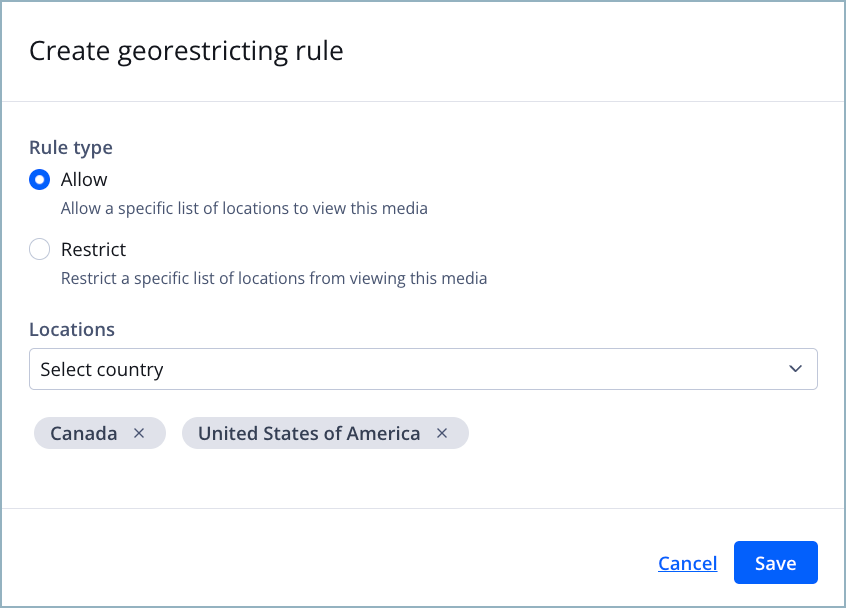
Create georestricting rule panel
Follow these steps to set and edit a georestricting rule for a property:
-
On the Properties tab, click the name of a property. The property settings appear.
-
Under Content protection, click Georestrictions. The Georestrictions tab appears.
-
Under Property georestricting, click Create property rule. The Create georestricting rule panel appears.
-
Select a Rule type:
- Allow: Allow a specific list of locations to view this media
- Deny: Block a specific list of locations from viewing this media
-
In the Locations dropdown menu, click the names of the countries to apply to the rule. The names of the countries appear in a list beneath the dropdown menu.
If you need to remove a country, click the country name in the list beneath the dropdown menu.
-
(Optional) Repeat step 5 to add another country to the rule.
-
Click Save. The panel closes and the georestricting rule appears under Property georestricting.
FAQ
What does a viewer from a blocked region see?
Viewers who click on content that is restricted in their locations will see an error and will not be able to view your content.
Can I apply multiple georestricting rules to my content?
Only one georestricting rule can be set for a property or a video. Furthermore, the global georestricting setting applies to all videos in the property except for those with their own georestricting rules.
Updated about 1 month ago