
Transformation agents ᴮᴱᵀᴬ
Learn how to create an agent
This is a beta offering. You can request access to this beta feature through your JWX representative.
By using this documentation, you are agreeing to abide by the terms of the JWP Beta Program Agreement.

A transformation agent defines how source content is transformed and published in JWX Studio.
When creating a transformation agent, you configure the following:
- Whether outputs are automatically published to your media library (making them immediately eligible for inclusion in playlists) or held for editorial review
- The transformation type and associated settings
After creation, a transformation agent can be reused across projects.
Create a transformation agent
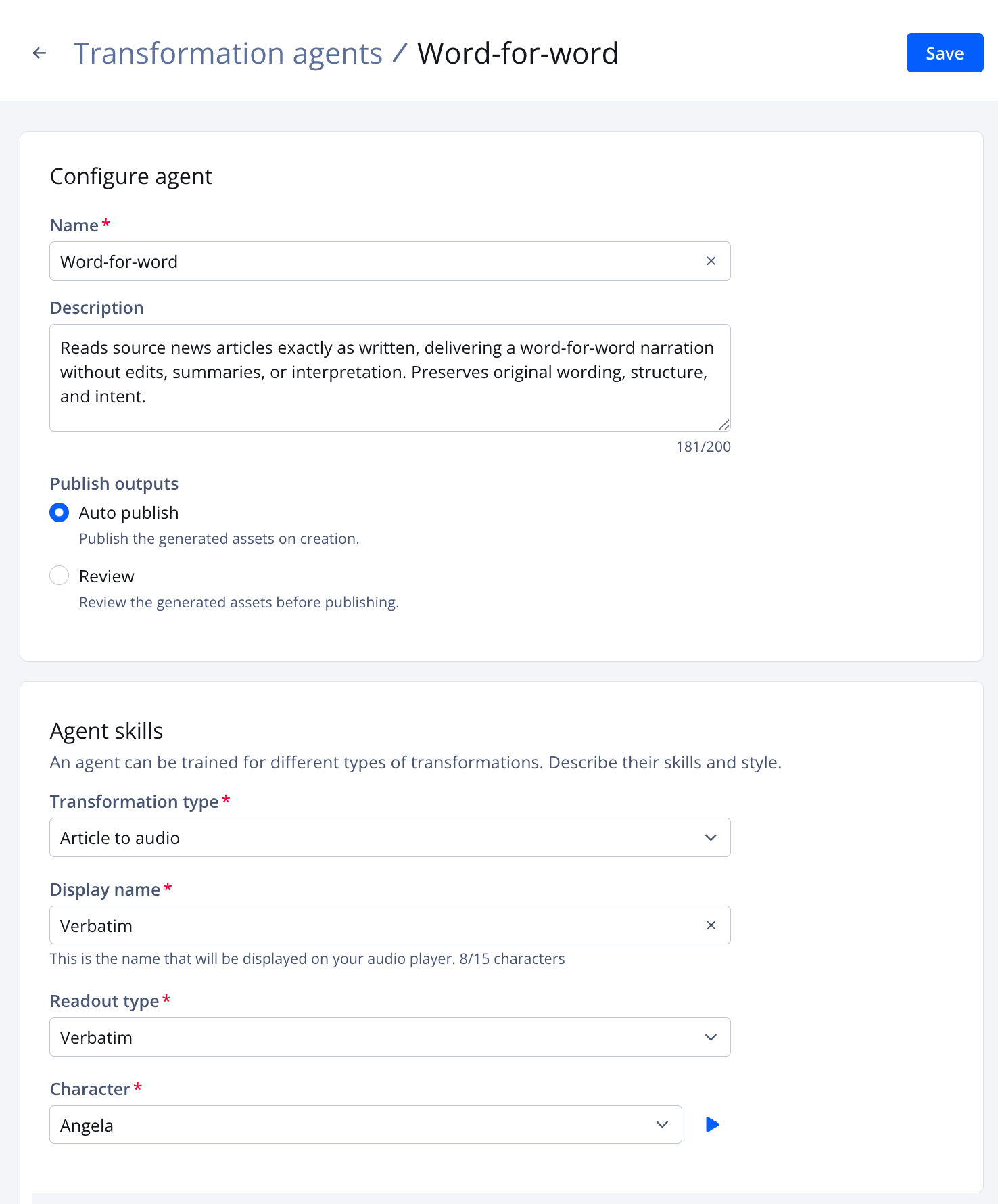
Create agent page
Follow these steps to create an agent:
- On the Properties page, click the name of a property. The property settings appear.
- Under JWX Studio, click Transformation agents. The Transformation agents tab opens.
- Click Create agent. The Create agent page appears.
- Enter a user-friendly Name used to identify this transformation agent when defining a project.
- (Optional) Enter an agent Description to explain when to use this agent.
- Choose one of the Publish outputs.
Publish output Description Auto publish Publish the generated assets on creation Review Review the generated assets before publishing - Define the Agent skill.
Article to audio
- From the Transformation type dropdown menu, select Article to audio. The settings appear.
- Enter the Display name. This must be less than 16 characters and will be displayed on the audio player.
- Select the Readout type.
Readout type Description Verbatim Transforms written content into exact word-by-word speech Prompt Transforms written content guided by instructions
Follow these steps:- Select Prompt. The Prompt instructions field appears.
Enter detailed guidance about how the content should be transformed, such as tone, framing, and length.
SAMPLE PROMPT: Summarize this article in 3 sentences or less, and always include the most representative quote in the article.
- Choose a Character.
Click ▶ (play icon) to preview the chosen voice.
If you have created a single character, that character will automatically be selected.
If no characters are listed, follow these steps:
- Click Create new character. The Create character page opens in a new tab.
- Create a character, using steps 4-7.
- Close the character-related tab.
- Select the newly created character from the **Character **dropdown menu.
Text to audio
- From the Transformation type dropdown menu, select Text to audio. The settings appear.
- Enter the Display name. This must be less than 16 characters and will be displayed on the audio player.
- Choose a Character.
Click ▶ (play icon) to preview the chosen voice.
If you have created a single character, that character will automatically be selected.
If no characters are listed, follow these steps:
- Click Create new character. The Create character page opens in a new tab.
- Create a character, using steps 4-7.
- Close the character-related tab.
- Select the newly created character from the **Character **dropdown menu.
Article to podcast
- From the Transformation type dropdown menu, select Article to pocast. The settings appear.
- Enter the Display name. This must be less than 16 characters and will be displayed on the audio player.
- Under Additional instructions, provide directions for the script.
EXAMPLE: Always start the script with the introduction "Welcome to your daily brief powered by JWX"
- Choose a Host.
- Choose a Guest.
When choosing the host or guest, click ▶ (play icon) to preview the chosen voice.
If you have created a single character, that character will automatically be selected.
If no characters are listed, follow these steps:
- Click Create new character. The Create character page opens in a new tab.
- Create a character, using steps 4-7.
- Close the character-related tab.
- Select the newly created character from the **Character **dropdown menu.
Article to video
- From the Transformation type dropdown menu, select Article to video. The settings appear.
- Under Additional instructions, provide directions for the script used to generate the video.
SAMPLE PROMPT: Use an engaging, conversational tone aimed at a general audience. Stick closely to facts stated in the article and avoid hyperbole or speculation.
- Under the Video settings, choose a Character.
Click ▶ (play icon) to preview the chosen voice.
If you have created a single character, that character will automatically be selected.
If no characters are listed, follow these steps:
- Click Create new character. The Create character page opens in a new tab.
- Create a character, using steps 4-7.
- Close the character-related tab.
- Select the newly created character from the **Character **dropdown menu.
Video to vertical
- From the Transformation type dropdown menu, select Video to vertical.
- Click Save. The agent is saved and listed on the Transformation agents tab.
Updated about 1 month ago